
• New
xtdimageregen - Safe Image Regenerator module - PrestaShop module by Extendo Modules

Safe Image Regenerator module

xtdimageregen
€19.90
Tax included

Safely regenerate PrestaShop product, category, and brand images using a controlled task queue instead of one resource-heavy operation.

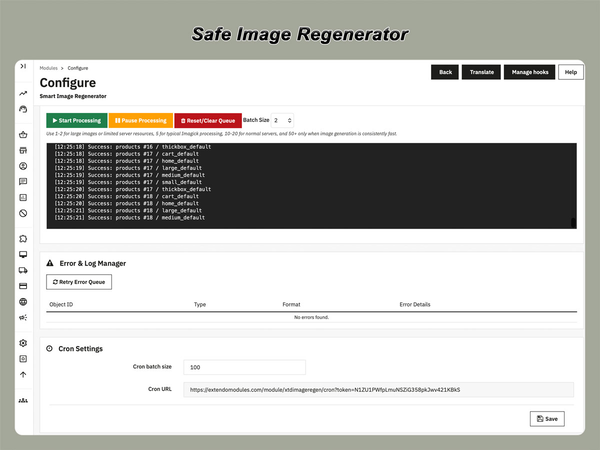
Process thumbnails in adjustable AJAX batches, monitor live progress, retry failed tasks, or automate regeneration with cron.

  • Queue-based image regeneration
  • AJAX batch processing
  • Automatic cron execution
  • Live progress and status tracking
  • Error logging with individual retries
  • Smart skipping of existing images
  • Adjustable batch size
  • Product, category, and brand images


Regenerate PrestaShop Images Without Overloading Your Server

Safe Image Regenerator is a PrestaShop image regeneration module designed to rebuild product, category, and brand thumbnails through a controlled queue-based process.

Instead of attempting to regenerate an entire image library in one large operation, the module divides the work into manageable tasks and processes them in adjustable batches. This reduces sudden server load and lowers the risk of interrupted or incomplete image regeneration on large catalogs and limited hosting environments.

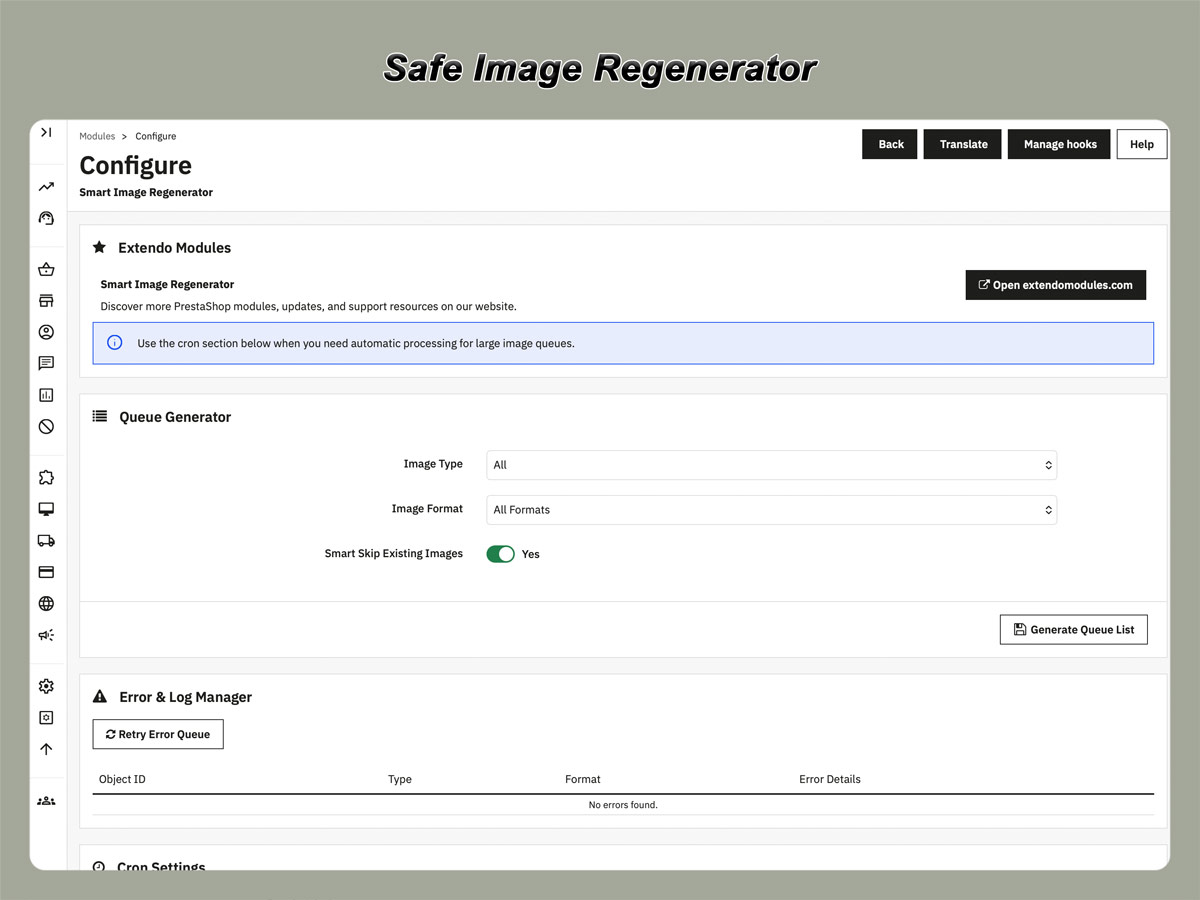
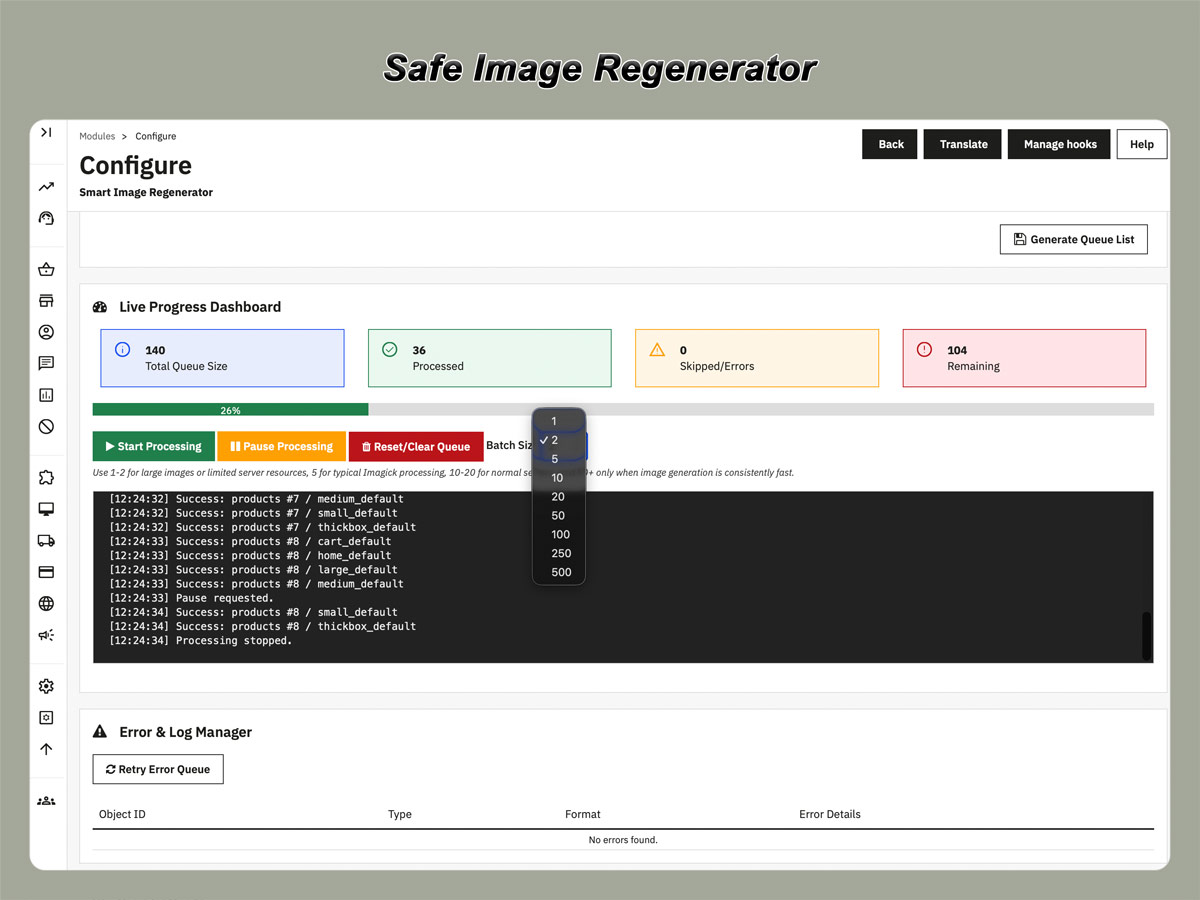
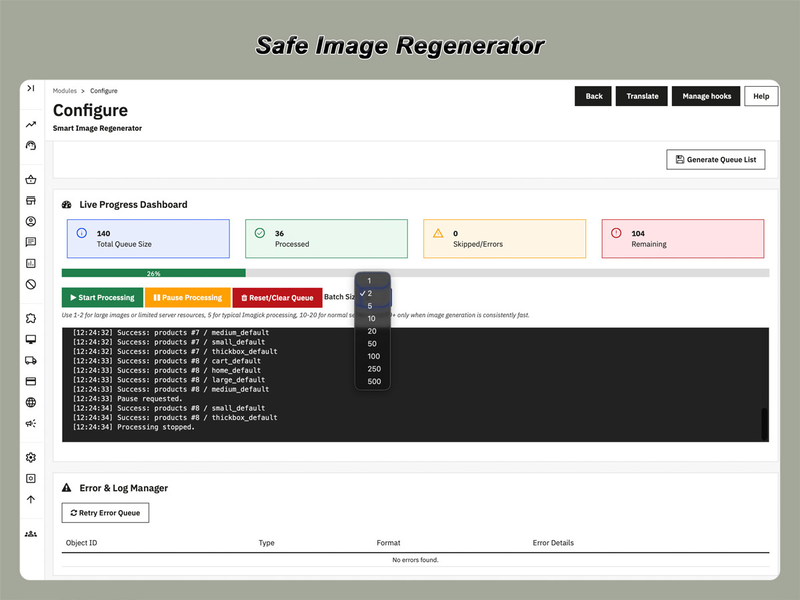
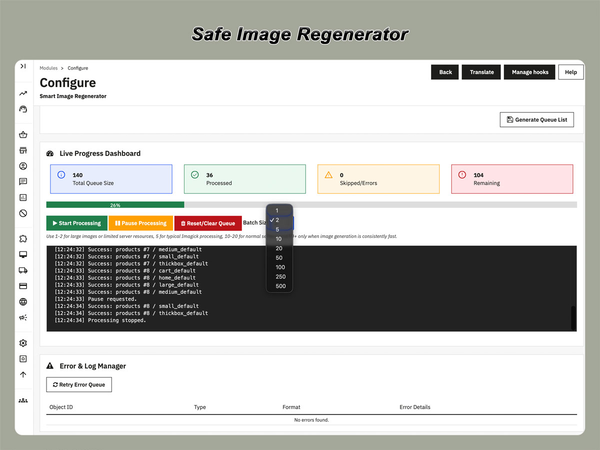
Regeneration can be started interactively from the PrestaShop back office using AJAX or processed automatically through cron. A live dashboard shows the current queue status, completed tasks, skipped images, remaining work, and regeneration errors.

Designed for safer image maintenance: create the regeneration queue once, process it in controlled batches, monitor every task, and retry only the images that failed.

Why Use Safe Image Regenerator?

PrestaShop stores may need to regenerate thumbnails after changing image dimensions, installing a new theme, migrating a catalog, restoring image files, or adding new image formats.

A standard one-time regeneration operation can become difficult to complete when a store contains thousands of images or runs under strict PHP execution and hosting resource limits. Safe Image Regenerator provides a more controlled workflow by storing regeneration tasks in a database queue and processing only a limited number of items at a time.

Main Features

Safe Queue-Based Processing

Selected images are added to a structured database queue before processing begins. This makes the operation easier to control, monitor, pause, and continue.

AJAX Batch Regeneration

Process image tasks directly from the module dashboard in smaller AJAX batches instead of running one long browser request.

Cron Automation

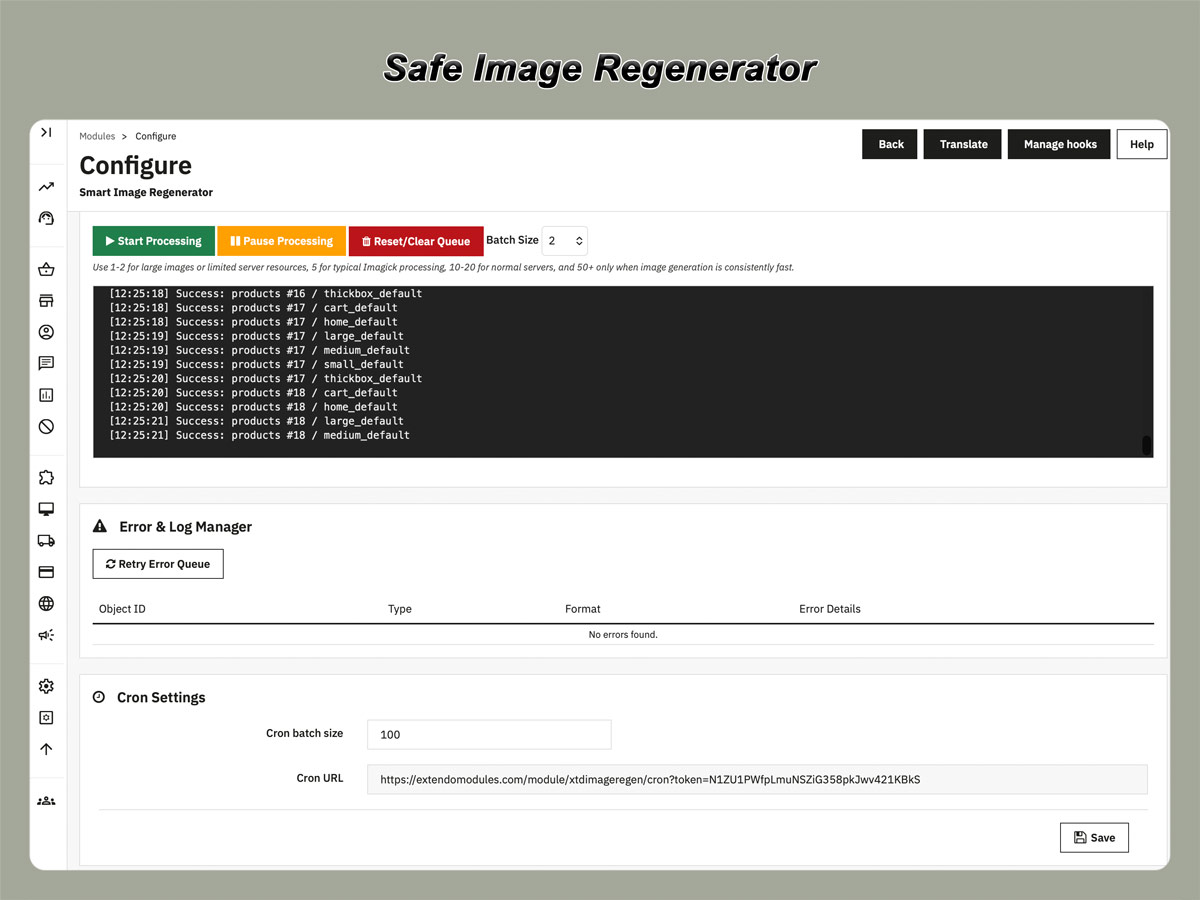
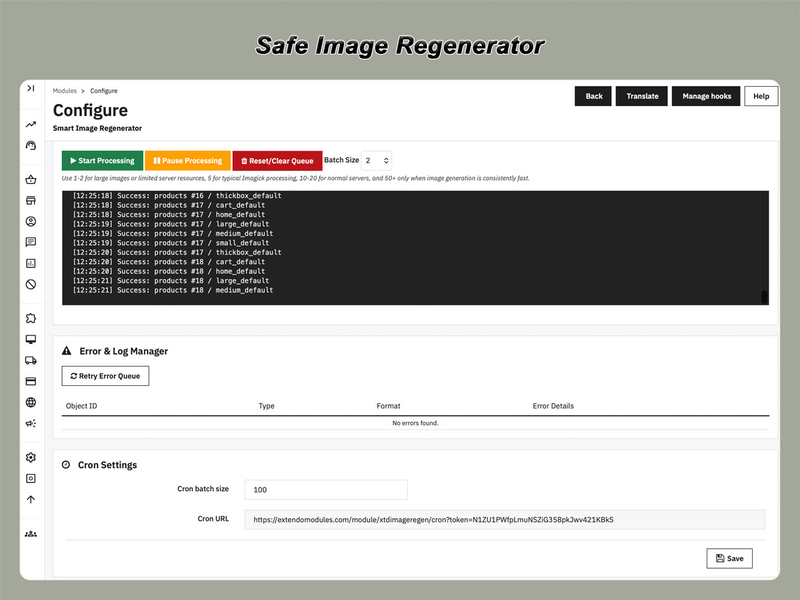
Run queued image regeneration automatically through cron, including during low-traffic periods when fewer server resources are required by customers.

Live Progress Dashboard

Follow the regeneration process in real time and see how many tasks are waiting, completed, skipped, or failed.

Error Logging and Retry

Review failed image tasks and retry them separately without rebuilding and restarting the complete regeneration queue.

Smart Existing-Image Detection

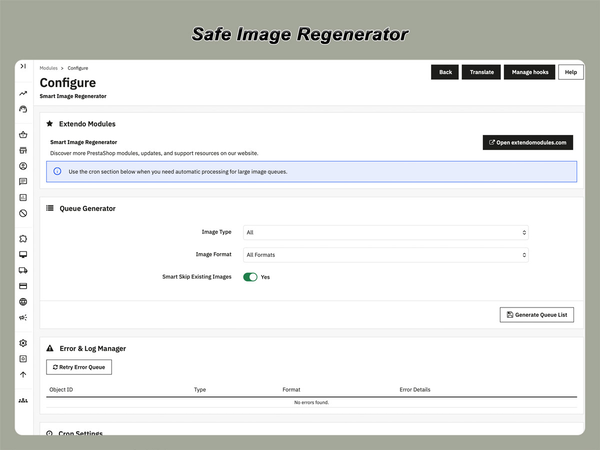
Skip thumbnails that already exist when they do not need to be generated again, reducing unnecessary processing.

Adjustable Batch Size

Configure how many image tasks are processed in each batch according to the capacity and limits of your hosting environment.

Multiple Image Sources

Regenerate image formats for products, categories, and brands from a single module workflow.

What Can You Regenerate?

  • Product images used on product pages, category listings, search results, and other storefront sections.
  • Category images displayed on category pages and category navigation blocks.
  • Brand images used for manufacturer and brand pages.
  • Selected image formats configured in your PrestaShop image settings.

How Image Regeneration Works

  1. Select the image source and image format that you want to regenerate.
  2. Create a database queue containing the required image tasks.
  3. Choose manual AJAX processing or automatic cron execution.
  4. Set a batch size suitable for your server resources.
  5. Monitor completed, skipped, pending, and failed tasks on the dashboard.
  6. Review errors and retry failed tasks when necessary.

Because task status is stored in the queue, the regeneration process remains transparent and manageable even when the complete image library cannot be processed in a single execution.

Safe Image Regenerator vs. Standard Regeneration

CapabilitySafe Image RegeneratorStandard PrestaShop Regeneration
Database task queueYesNo
AJAX batch executionYesNo
Cron processingYesNo
Detailed live progressYesLimited
Error logYesNo
Retry failed tasksYesNo
Skip existing thumbnailsYesNo
Adjustable batch sizeYesNo
Suitable for scheduled processingYesNo

Common Use Cases

Theme Changes

Generate thumbnails required by a newly installed theme or updated storefront layout.

New Image Dimensions

Rebuild thumbnails after adding or changing image formats in the PrestaShop image settings.

Store Migration

Restore the required thumbnail files after transferring a store, catalog, or image directory.

Missing Thumbnails

Recreate missing product, category, or brand image formats without unnecessarily rebuilding existing files.

Large Catalog Maintenance

Process extensive image libraries in smaller batches with visible progress and recoverable errors.

Scheduled Image Processing

Use cron to process the queue automatically outside your store’s busiest operating hours.

Who Is This Module For?

  • PrestaShop stores with large product catalogs or extensive image libraries.
  • Merchants using shared hosting or servers with limited execution resources.
  • Store administrators who need clear regeneration progress and error reporting.
  • Developers performing PrestaShop migrations, theme changes, or catalog recovery.
  • Teams that want to automate thumbnail regeneration through cron.
  • Stores that regularly add or modify PrestaShop image formats.

Key Benefits

  • Reduce the server impact of large image regeneration operations.
  • Lower the risk of losing progress after an interrupted browser request.
  • Regenerate only the required image sources and formats.
  • See detailed processing progress instead of waiting without feedback.
  • Retry failed tasks without restarting the complete operation.
  • Schedule unattended processing with cron.
  • Adapt batch processing to the available hosting resources.

A More Controlled Way to Regenerate PrestaShop Thumbnails

Safe Image Regenerator combines task queues, batch processing, cron automation, progress tracking, and recoverable errors in one practical PrestaShop image maintenance tool.

Frequently Asked Questions

Does the module regenerate product images?

Yes. It supports product images as well as category and brand images. You can select the image source and format that should be processed.

Is the module suitable for large PrestaShop catalogs?

Yes. Queue-based processing and adjustable batch sizes are particularly useful when a store contains a large number of image files.

Can image regeneration run automatically?

Yes. Queued tasks can be processed automatically using cron instead of keeping the module page open in the browser.

Can I control the server load?

You can adjust the batch size to limit how many tasks are processed during each execution. The appropriate value depends on your hosting resources and PHP limits.

What happens when an image cannot be generated?

The failed task is recorded in the error log. You can review the problem and retry the failed item without recreating the complete queue.

Will existing thumbnails be processed again?

The module includes an option to detect and skip image files that already exist, helping avoid unnecessary regeneration work.

Do I need technical knowledge to use the module?

Manual regeneration is managed from the module dashboard. Cron automation requires access to your hosting cron configuration or another scheduled-task service.

Downloading, registering and using a module

Current version: 1.0.1


Version 1.0.1

Initial release

Product added to wishlist